
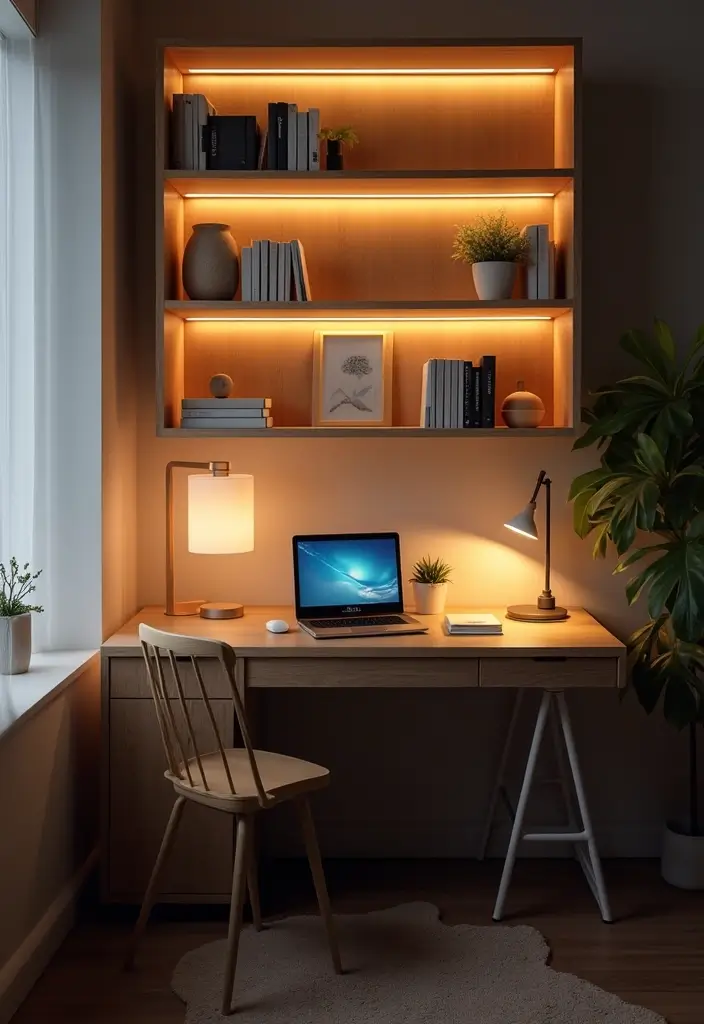
Better Lighting for Your Home Office
After more than 15 years designing functional and comfortable spaces, one truth consistently stands out: good lighting isn’t a luxury, it’s a non-negotiable foundation for productivity and well-being. Many folks jump into setting up a home office, focusing on the desk and chair, but completely overlook how critical proper illumination is. I’ve seen countless clients struggling with eye strain, fatigue, and even headaches – issues often directly traceable to poorly planned lighting.
Layering Your Light for Optimal Performance
When I approach any workspace, I don’t just think “bright.” I think “layers.” Just like a good outfit, you need different elements working together. We’re talking about three primary types of lighting: ambient, task, and accent. Beginners often miss this nuance, relying on a single overhead fixture or a cheap desk lamp, which rarely cuts it.
Ambient lighting is your general room illumination. Think recessed lights, a flush-mount ceiling fixture, or even a floor lamp bouncing light off the ceiling. Its purpose is to provide a comfortable base level of light, preventing stark contrasts that cause your eyes to constantly adjust. For a home office, I usually aim for a warm neutral color temperature, around 3000K to 3500K. I once had a client who had only a single, cool-white fluorescent tube in their office. Their complaints of feeling ‘sterile’ and ‘unfocused’ vanished the moment we installed some warmer, diffused ambient lighting. Without this base layer, your task lighting becomes a harsh spotlight in a dark cave, leading straight to eye fatigue.

Task lighting is exactly what it sounds like: focused light for specific activities. This is typically your adjustable desk lamp. The key here is flexibility – you need to direct the light precisely where you’re working, whether that’s typing, reading documents, or sketching. A common mistake I see is a task lamp that’s too weak or, conversely, too powerful and creates glare. I often recommend a lamp with a dimmer and an articulated arm. I personally use a swing-arm desk lamp that clamps to the back of my desk, keeping the base off my valuable workspace while allowing me to pull the light directly over my keyboard or notepad.
Accent lighting is the least critical for function but powerful for mood and depth. This could be a small picture light, LED strips behind your monitor, or a small table lamp illuminating a bookshelf. It breaks up the monotony and adds visual interest. While not directly productivity-focused, a well-placed accent light can make your office feel more inviting and less utilitarian, subtly boosting your mood.
Eliminating Glare and Hot Spots: A Pro’s Perspective
Glare is the enemy of comfortable work. It’s reflected light that hits your eyes directly or indirectly, causing strain. The most common culprit? Your computer monitor and nearby windows. I’ve walked into countless home offices where a desk is pushed right up against a window, causing blinding backlighting or harsh reflections on the screen. Or, a desk lamp is positioned so its bulb is visible, shooting light directly into the user’s eyes.
My first rule of thumb: never place your monitor directly in front of or behind a window. If possible, position your desk so the window is to your side. If that’s not feasible, invest in good blinds, curtains, or even a sheer shade to diffuse natural light. For artificial light, ensure all light sources are shaded or diffused. Use diffusers on overhead lights, and position desk lamps so the light source itself isn’t visible when you’re seated. A quality monitor light bar, which shines light down onto your desk without hitting the screen, has become a game-changer for many of my clients, drastically reducing screen glare and enhancing visibility.
Understanding Color Temperature and Color Rendering Index (CRI)
Beyond brightness, the quality of light – its color temperature and how accurately it renders colors – is often overlooked by beginners. Color temperature is measured in Kelvin (K). Lower K values (2700K-3000K) are warm, yellow-white, like incandescent bulbs. Higher K values (4000K-5000K+) are cool, blue-white, like daylight or traditional office fluorescents.
For a home office, I generally steer clients towards a neutral to slightly warm white light for ambient and task lighting, typically between 3000K and 4000K. Why? 2700K can feel too warm and make you sleepy, while 5000K can feel stark and clinical. 3500K-4000K strikes a good balance, promoting alertness without feeling harsh. I once consulted for a graphic designer who complained about colors looking different on her screen versus her printouts. Her office had cheap 6500K LED bulbs, giving everything a blue tint. Switching to 4000K LEDs with a high CRI solved her problem almost instantly, as the new light accurately represented colors.
And that brings me to CRI, or Color Rendering Index. This measures how accurately a light source reveals the true colors of objects compared to natural light. A CRI of 80 or above is generally good, but for tasks requiring color accuracy (like design work, photography, or even just distinguishing between shades of paper), I push for 90+. Using high CRI bulbs means that red document will look genuinely red, not a dull, desaturated version, reducing visual fatigue and improving accuracy.
Integrating Smart Lighting and Dynamic Control
In today’s world, static lighting is often a missed opportunity. I’ve found that incorporating smart lighting solutions, even simple ones, significantly enhances the flexibility and adaptability of a home office. This isn’t just about turning lights on and off with your voice; it’s about dynamic control over color temperature and brightness throughout your day. Imagine starting your morning with a cooler, brighter light (around 4000K) to help you wake up and focus, then gradually shifting to a warmer, softer light (3000K) as the afternoon progresses and natural light fades, mimicking the natural daylight cycle. This supports your circadian rhythm, which can have a profound impact on energy levels and sleep quality. I guided a software developer through setting up a simple schedule with smart bulbs, and he reported feeling more energetic through his afternoon slump and sleeping better at night. It’s a small change with a big payoff.
Another benefit is granular control over individual fixtures. With a smart system, you can dim your accent lighting independently, or brighten just your task lamp for a specific detail-oriented chore, without affecting the ambient light level. This level of customization allows you to create the perfect lighting environment for any task or time of day, rather than being stuck with a one-size-fits-all approach. For example, during video calls, I often slightly increase the ambient light directly in front of me and slightly dim overheads to reduce shadows on my face, something easily done with a quick voice command or app tap.
Practical Lighting Tips from My Toolkit
- Maximize Natural Light: Position your desk perpendicular to a window if possible. Use sheer blinds or drapes to diffuse harsh sunlight, not block it entirely.
- Invest in Dimmers: Every light source should ideally be dimmable. This flexibility allows you to adjust brightness based on the time of day, ambient light, and specific task.
- Choose Adjustable Task Lamps: A desk lamp with a flexible arm and an opaque shade is crucial. Position it to illuminate your work without creating glare on your screen or shining directly into your eyes.
- Mind the Monitor: Use a monitor light bar to illuminate your desk area without shining into your screen, reducing eye strain. Ensure your monitor’s brightness matches the room’s ambient light.
- Select Appropriate Color Temperatures: Aim for 3500K-4000K for primary work lights. Consider dynamic tunable white bulbs for circadian rhythm support.
- High CRI for Accuracy: For any task involving color perception (design, art, even reading charts), use bulbs with a CRI of 90 or higher.
- Balance All Sources: Avoid extreme contrasts. Your room shouldn’t have a bright spotlight in a dark corner; ensure a smooth gradient of light.
Common Mistakes to Avoid
- Relying on a Single Overhead Light: This creates shadows, glare, and a flat, uninspiring environment. You need layers.
- Placing Your Desk Facing or Back to a Window: Direct window light causes either blinding glare or harsh backlighting on your screen.
- Using Lamps with Visible Bulbs: Unshaded or poorly positioned bulbs can cause direct glare and significant eye strain.
- Ignoring Color Temperature: Using overly cool (blue) or overly warm (yellow) light can affect mood, focus, and color perception.
- Forgetting About Glare on Screens: Reflections from overhead lights or windows are a major source of eye fatigue.
- Not Using Dimmers: Static brightness limits adaptability and comfort throughout the day.
Frequently Asked Questions
Why does my home office lighting give me headaches?
Headaches from office lighting are incredibly common and usually stem from one or more issues: too much glare, insufficient light leading to eye strain, harsh contrasts between bright and dark areas, or flickering light sources. Often, it’s a combination. For example, a single, bright overhead light in a dark room creates a sharp contrast between your screen and the surrounding area, forcing your eyes to constantly adjust. Try introducing ambient lighting, using a focused task lamp, and checking for screen reflections. I’ve found that simply diffusing overhead light or adding a monitor light bar can alleviate a lot of that discomfort.
Where should I place my desk lamp for optimal lighting?
Your desk lamp (task lighting) should be placed opposite your dominant hand to prevent shadows. So, if you’re right-handed, place the lamp on your left. The key is to position it so the light falls directly on your work surface (keyboard, documents) without shining directly into your eyes or creating glare on your monitor. An articulated arm is invaluable here, allowing you to direct the light precisely. Ensure the light source itself is shielded by an opaque shade. I’ve often seen lamps placed too far back or too low, making them ineffective. Bring that light source closer to your work, keeping it slightly above eye level.
Can natural light be too much for a home office?
Absolutely. While natural light is fantastic, too much direct sunlight can be a major source of glare, heat, and visual discomfort. If your desk is directly in front of or behind a window, you’ll either be squinting into blinding light or dealing with significant screen reflections and harsh shadows. The ideal scenario is to have natural light coming from the side. If that’s not possible, sheer curtains, blinds, or even a frosted window film can diffuse the light, making it softer and more manageable without blocking it entirely. I always advise clients to think of natural light as an excellent ambient layer, but it often needs careful control to be truly effective in a workspace.